

Agents are getting good at databases. GitHub Copilot and MCP clients can read your schema, write a query, and run it straight against your connection. That is the appeal, and the problem: the same tool call that runs a SELECT can run a DROP TABLE. You want the help without handing over the keys.
Cap what AI can do, per connection
DBCode AI roles limit what AI agents may do on a connection, separately from what you can do. You keep full access; the agent gets a leash. Open a connection’s settings and find the AI access picker.

Pick a built-in role
- Same as user (the default) - the agent follows the same rules you do. Nothing changes.
- Read-only - the agent can run
SELECTand browse the schema. Every write is denied. - Collaborator - the agent reads freely and asks you before any insert, update, or delete.
DROPandTRUNCATEstay off entirely. - Blocked - the agent cannot touch the connection at all. It still appears in the list, marked blocked, so the agent knows the database exists but every call against it is rejected.
Try it
Set a connection to Read-only and ask Copilot to “delete the test orders.” The request comes back denied, before it ever reaches the database. Switch to Collaborator and the same request asks you to confirm first.
If the connection already has a role like Production, the stricter of the two wins - an AI role can only take access away, never add it. The connection editor shows a You vs AI grid, so you can see what the agent ends up with before you save.
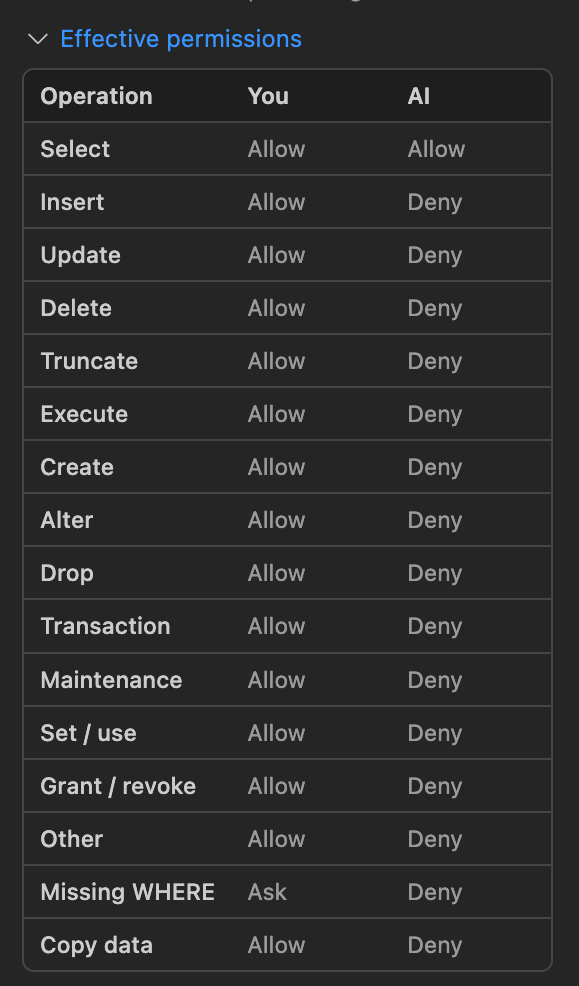
Same rules for Copilot and MCP
The rules apply the same way whether the agent reaches your database through GitHub Copilot Chat or an external MCP client. The check lives inside DBCode, not in a per-tool setting the agent can talk its way around.
Need something between the built-ins? Define custom roles in settings with your own per-statement rules. Assigning an AI role is a DBCode Pro feature, and you can drop any connection back to Same as user at any time.