

DBCode works as an MCP server for SQL Server that uses the connections you already have, including Windows Authentication, Integrated (Kerberos), and Microsoft Entra ID. Install it, save the connection, and Claude Code, Cursor, or Copilot can list databases, read schemas, and run T-SQL under a role you choose, with no connection string in the agent’s config.
It works for on-prem SQL Server, named instances, LocalDB, and Azure SQL.
1. Install DBCode and add the connection
Install DBCode in VS Code, Cursor, or another VS Code editor from the install page. Add a SQL Server connection and pick the authentication you already use:
- SQL Server Authentication: user name and password.
- Windows Authentication: a Windows domain account.
- Integrated (Kerberos): your current login session, no password. Works on Windows, and on macOS and Linux after
kinit user@REALM. - Microsoft Entra ID: for Azure SQL.
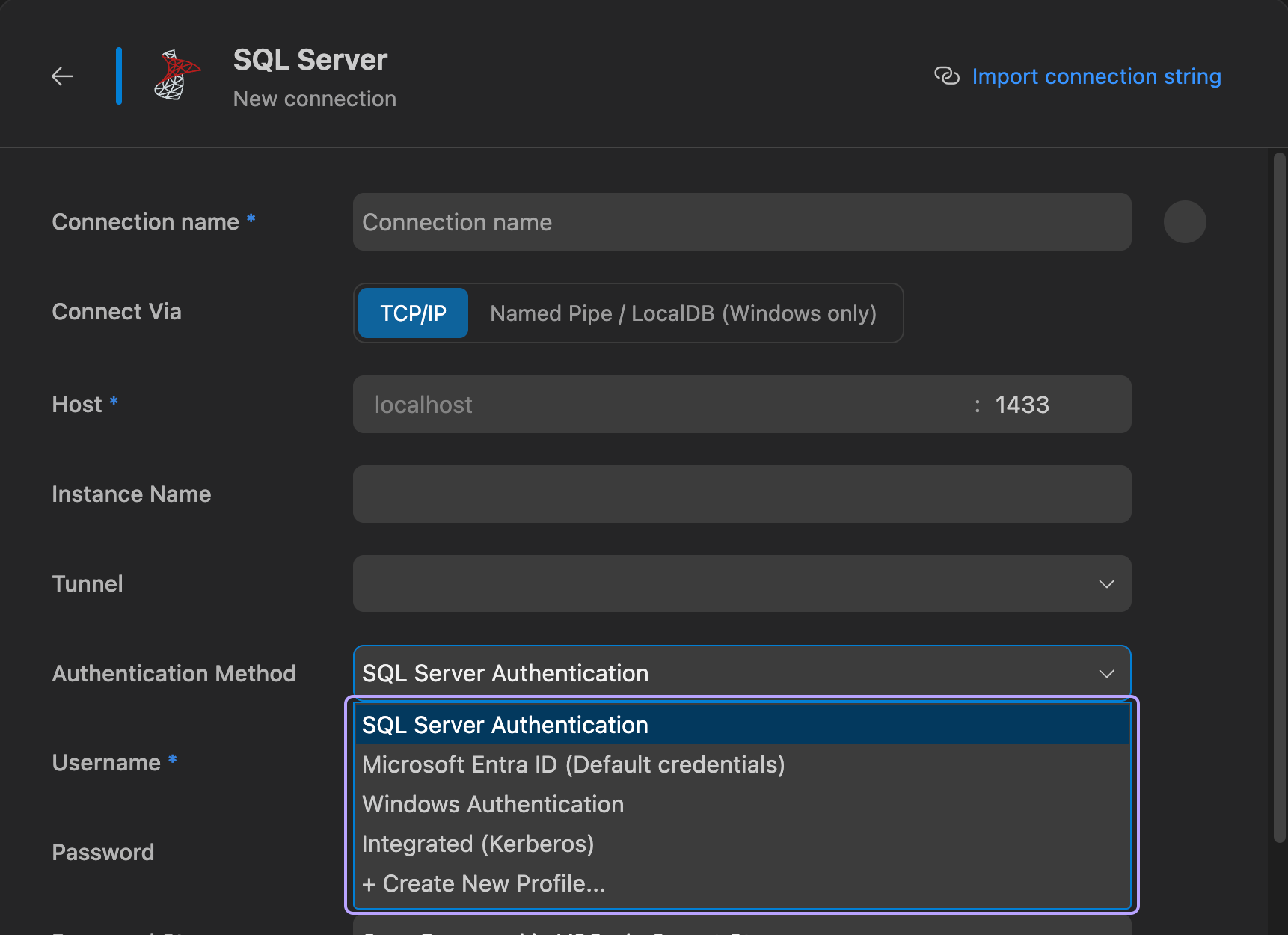
Named instances go in their own field (host myserver, instance SQLEXPRESS), and on Windows you can connect over named pipes or to LocalDB. More in the SQL Server docs.
2. Connect your agent
- Copilot in VS Code, and Cursor: nothing to configure. DBCode registers its MCP server with the editor, so it’s already in the tools picker.
- Windsurf, Kiro, Antigravity: click Enable when DBCode offers to set up the agent.
- Claude Code: run DBCode: Install CLI from the command palette, then:
claude mcp add dbcode -- dbcode mcpIn-editor agents use the connection exactly as you do, whatever its authentication. Claude Code and other external agents start dbcode mcp, which opens most connections on its own; run dbcode connections and the cli column tells you if one can’t be opened from there.
3. Ask in plain English, get T-SQL
“List the databases on my SQL Server connection. In Sales, read the schema for the Orders and Customers tables, then show the top 20 customers by revenue this quarter.”
The agent reads your real tables and columns first, then writes T-SQL against them.
4. Make it read-only
For production, combine a database-level limit with DBCode’s.
Give the agent a login that can only read:
CREATE LOGIN ai_reader WITH PASSWORD = 'change-me-Str0ng!';USE Sales;CREATE USER ai_reader FOR LOGIN ai_reader;ALTER ROLE db_datareader ADD MEMBER ai_reader;Save a connection that uses ai_reader, then set its AI access to Read-only in the connection editor. The agent can run SELECT and read the schema. INSERT, UPDATE, DELETE, EXECUTE, and DDL are denied before they reach the server.
Want the agent to change data on dev, but with you in the loop? The Collaborator AI role asks before inserts, updates, deletes, and EXECUTE, and never runs DROP or TRUNCATE. Assigning an AI role is a Pro feature; the connection’s own Read Only mode and roles are free. The full layered setup is in how to let an AI agent query production safely.
Other SQL Server MCP options
To be fair to the alternatives:
- Microsoft’s SQL MCP Server (part of Data API builder) is the better fit when you want the agent limited to specific tables and fields, with no free-form SQL at all. You list entities in a
dab-config.json, and access control is per entity and per field. It deliberately doesn’t do schema changes. - DBHub (by Bytebase) is an open source server that supports SQL Server among a handful of engines. It runs headless from a connection string, which suits CI.
DBCode makes sense when you want the agent writing real T-SQL against the connections you already use, under limits you set per connection. More in DBCode vs standalone database MCP servers.
FAQ
Is there an official MCP server for SQL Server?
Microsoft ships SQL MCP Server as part of Data API builder. You whitelist tables, views, and stored procedures in a config file, and the agent works through fixed create, read, update, delete, and execute tools rather than writing SQL. DBCode takes the other approach: the agent writes T-SQL against your saved connection, limited by a role you set.
Can an AI agent connect to SQL Server with Windows Authentication?
Through DBCode, yes, inside the editor: a connection that uses Windows Authentication, Integrated (Kerberos), or Microsoft Entra ID works for Copilot, Cursor, and other in-editor agents the same way it works for you. From an external agent like Claude Code, run dbcode connections and check the cli column for that connection.
How do I make a SQL Server MCP server read-only?
Two ways, and use both on production. Log the agent's connection in as a user that is only in db_datareader. Then set the connection's AI access to Read-only in DBCode, which denies every statement except SELECT before it reaches the server.
Does it work with Azure SQL?
Yes. Add the Azure SQL database as a SQL Server connection in DBCode, with SQL authentication or Microsoft Entra ID, and the agent uses it like any other connection.
Can the agent run stored procedures?
It depends on the role. EXECUTE is its own statement type in DBCode's permission grid: the built-in Collaborator AI role asks you before running one, and Read-only denies it.