

To let an AI agent query production safely, give it a connection it can’t write through: a database user with only SELECT grants, the connection’s read-only mode on, and an AI role that denies every write whatever the agent asks for. Put those limits in the tools, not in the prompt. An agent can ignore an instruction, but it can’t run a statement the tool refuses.
The rest of this guide sets that up with DBCode, which works the same for Claude Code, Cursor, Copilot, Windsurf, Kiro, and Antigravity across 100+ databases.
Why prompt rules aren’t enough
Agents follow instructions most of the time. “Most” is the problem.
- In July 2025, Replit’s agent deleted SaaStr’s production database during an explicit code freeze. Jason Lemkin said afterwards there was “no way to enforce a code freeze” in the tool (The Register).
- In February 2026, Claude Code ran
terraform destroyagainst a state file that pointed at production, taking the database and its automated snapshots with it (Alexey Grigorev’s write-up). - In April 2026, a Cursor agent at PocketOS found an unrestricted API token in an unrelated file and deleted the volume holding production data with one call (DevOps.com).
None of these were stopped by what the agent was told. They would have been stopped by what the agent was allowed to do.
The layers, from the database out
Each layer works on its own. Stack them for production.
- A least-privilege database user. The only limit the database itself enforces. Give the agent’s connection a user with
SELECTgrants and nothing else, ideally on a read replica. - Read-only mode on the connection. DBCode’s driver-level read-only mode, on drivers that support it. Free.
- The connection’s role. A Production role sets which statement types are allowed, asked about first, or denied, for anyone using the connection. Free.
- An AI access role. A separate, narrower role for agents only. The stricter of this and the connection role wins. Pro.
- Missing WHERE detection. Catches an
UPDATEorDELETEwith noWHEREclause, whether you or an agent wrote it. On MongoDB, anupdateManyordeleteManywith an empty filter trips it too. Free. - Data masking. Replaces sensitive values in results before they reach the agent. Pro.
AI roles in more detail: Put guardrails on AI database access
Set it up
1. Create a read-only database user
On Postgres:
CREATE ROLE ai_reader LOGIN PASSWORD 'change-me';GRANT CONNECT ON DATABASE app TO ai_reader;GRANT USAGE ON SCHEMA public TO ai_reader;GRANT SELECT ON ALL TABLES IN SCHEMA public TO ai_reader;ALTER DEFAULT PRIVILEGES IN SCHEMA public GRANT SELECT ON TABLES TO ai_reader;Other databases have their own equivalent. The SQL Server guide has the T-SQL version.
2. Save a separate connection for the agent
In DBCode, add a connection to production that logs in as ai_reader. Name it so it’s obvious, like prod (agent). Then, in the connection editor:
- Turn on Read Only in the Role section, and pick the Production role.
- Set AI access to Read-only.
If you also keep your own full-access production connection, set its AI access to Blocked. AI roles apply per saved connection, so the agent should only be able to reach production through the one you’ve locked down.
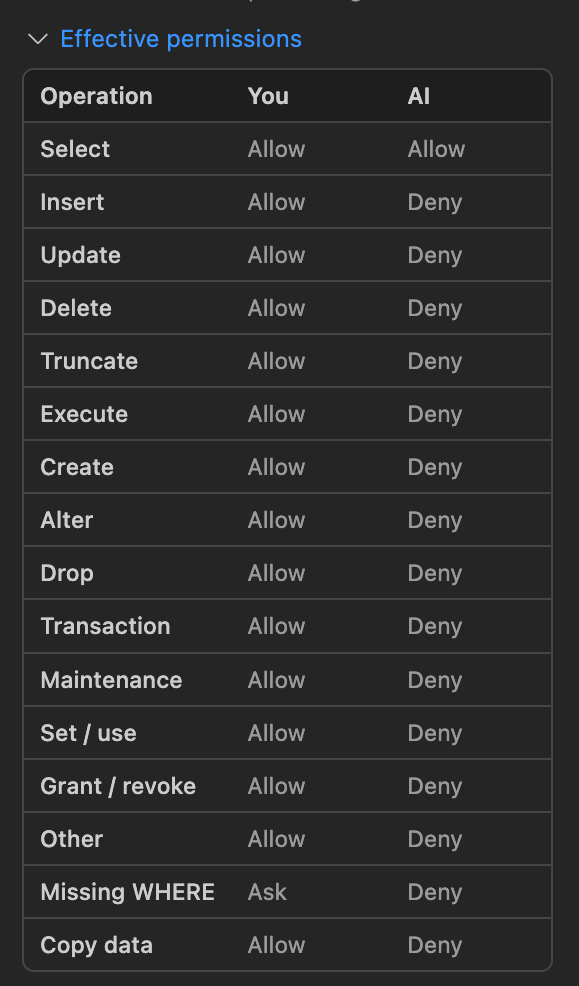
The connection editor shows what you can run and what the agent can run side by side, so you can check the result before saving.
3. Connect your agent
- VS Code (Copilot) and Cursor: nothing to do. DBCode registers its MCP server with the editor.
- Windsurf, Kiro, Antigravity: click Enable when DBCode offers to set up the agent.
- Claude Code: run DBCode: Install CLI, then
claude mcp add dbcode -- dbcode mcp.
Full setup per agent is in the MCP docs.
4. Try to break it
Ask the agent to “delete the test orders on prod (agent)”. The call comes back denied, before anything reaches the database. Then ask it to “count orders by status for last week” and it runs as normal.

For example, here’s Claude Code against a connection with the Read-only AI role. All three DELETE statements were refused by DBCode, and the agent says so instead of hunting for a way around it.
Prefer Deny over Ask for production
The Collaborator AI role asks you before inserts, updates, and deletes, which is handy on dev. On production, use Deny.
Approval prompts can be skipped. In VS Code, saved tool approvals and modes like Bypass Approvals or Autopilot can suppress later Ask First prompts. DBCode’s own Deny permissions and the Blocked role are never bypassed by those settings. If you do rely on Ask, set the DBCode tool to false in chat.tools.eligibleForAutoApproval so it always needs a manual click.
What DBCode doesn’t cover
Be clear about the boundary. DBCode’s limits apply to what an agent runs through DBCode. They don’t stop an agent with shell access from running terraform destroy, or calling your cloud provider’s API with a token it found in a file. Two of the three incidents above went that way.
For those:
- Keep production credentials and API tokens out of the agent’s reach.
- Turn on deletion protection for production databases and volumes.
- Keep backups outside the lifecycle of the thing being backed up, and test the restore.
A few limits inside DBCode, too:
- A
SELECTcan still have side effects. Some databases let aSELECTcall a function that writes. Driver-level read-only mode and a least-privilege user cover that; the AI role alone doesn’t. - Workspace settings are files. An agent that can edit
.vscode/settings.jsoncould relax a custom AI role defined there, change a workspace connection’s AI access, or edit its masking. Save the agent’s production connection in user settings, not the workspace. - Masking is a guardrail, not a boundary. If an agent must never read a table, keep it off any connection whose AI access isn’t Blocked, or connect as a database user with no
SELECTon that table. See how to mask PII before your AI agent sees it.
What’s free
The MCP server, read-only mode, connection roles, and missing WHERE detection are free. Pro adds AI access roles and AI data masking. See pricing.
AI access roles docs · Connection roles docs
FAQ
Can Claude Code delete my production database?
If it has a tool or credential that can, yes. Agents have dropped production data, including Claude Code in February 2026 and Replit's agent in July 2025. Through DBCode, setting a connection's AI access to Read-only denies DELETE, DROP, and every other write before it reaches the database.
Is a rule like 'never write to production' in CLAUDE.md enough?
No. Instructions in a prompt or rules file are requests the model usually follows. Use limits the tool enforces: a database user with only SELECT grants, a read-only connection, and an AI role that denies writes.
Should the agent use a read replica?
If you have one, yes. Pair it with a database user that only has SELECT, and the agent can neither change data nor load the primary.
Does read-only stop the agent seeing sensitive data?
No. Read-only stops changes, not reads. To keep values like emails and card numbers out of the agent's context, add AI data masking on the connection.
Do these limits apply in Cursor and Claude Code, or only Copilot?
All of them. Connection roles, AI roles, and masking are checked inside DBCode, so they apply the same way to Copilot Chat, Cursor, Windsurf, Kiro, Antigravity, Claude Code, and any other MCP client.
Which of these features are free?
The MCP server, read-only mode, connection roles, and missing WHERE detection are free. Assigning an AI access role and AI data masking are Pro features.