

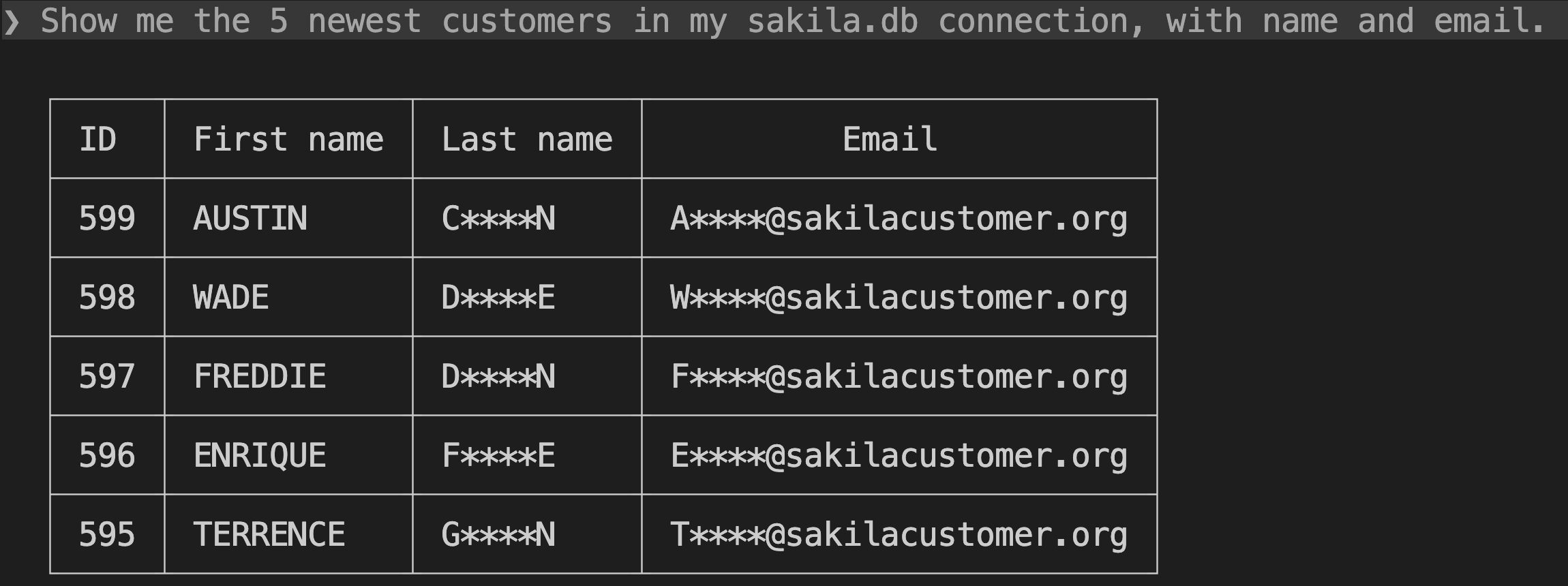
To keep PII away from your AI agent, mask it in the query results before they reach the agent. DBCode does this per connection: built-in detectors catch emails, card numbers, SSNs, phone numbers, IBANs, and secrets in whatever a query returns, and column rules cover the rest, so Claude Code, Cursor, or Copilot can work with production data without reading the sensitive parts.
You keep seeing real values. Only results going back to an agent are masked.
Why this matters
When an agent runs SELECT * FROM customers to answer a reasonable question, every email address and phone number in those rows goes to the model provider as part of the conversation. Nobody decided to share them. It just happened as a side effect.
Masking replaces those values before the results leave DBCode, whichever agent asked: Copilot Chat, Cursor, Windsurf, Kiro, Antigravity, Claude Code, or any other MCP client.
Turn it on
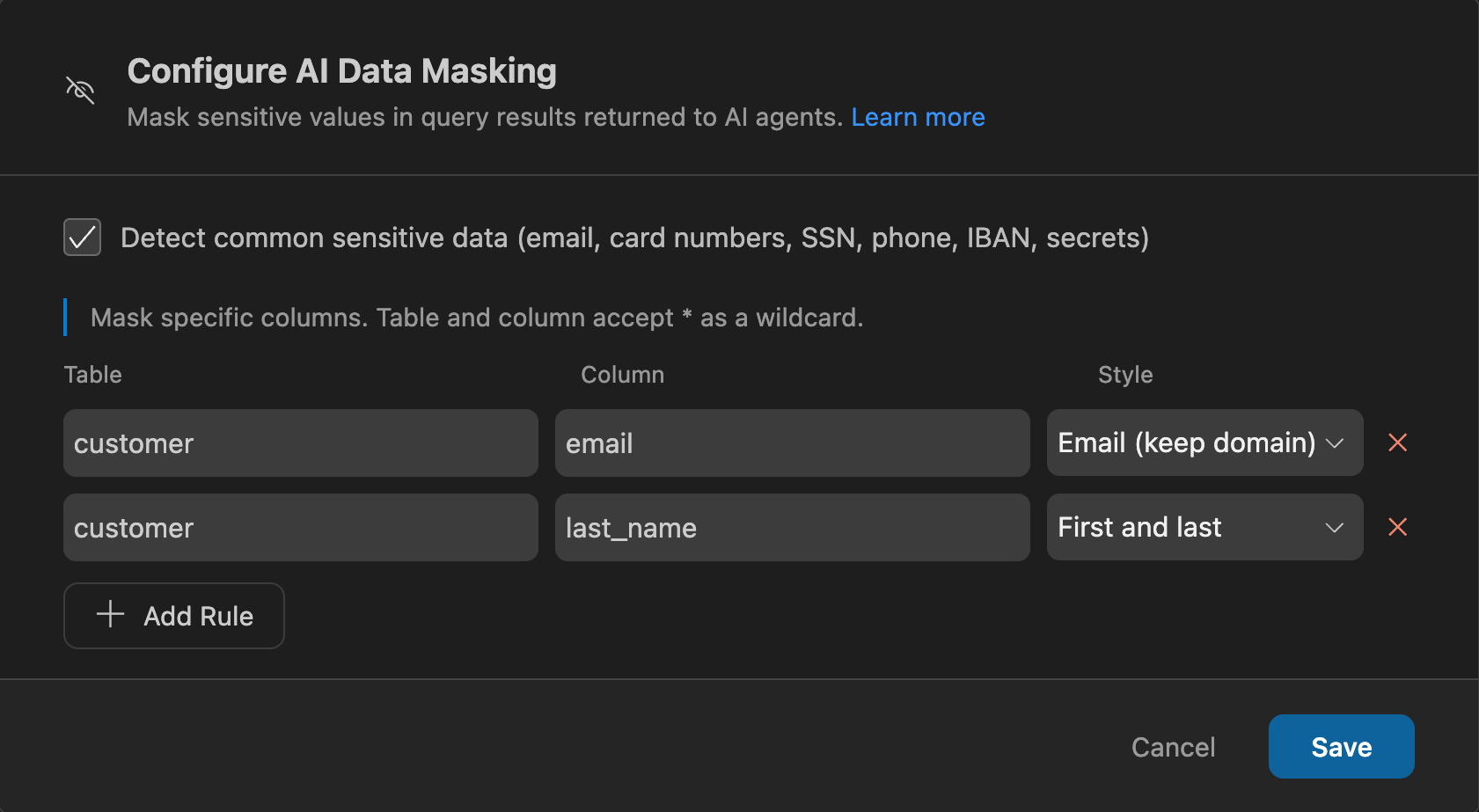
Open the connection in DBCode’s connection editor and go to AI access, then click Configure next to Data masking. Masking has two parts.
Detectors
The built-in pack recognizes:
- Email addresses
- Credit card numbers, verified with the Luhn checksum
- US social security numbers
- Phone numbers
- IBANs, verified with the ISO checksum
- API keys and other secrets
Detectors read the values a query actually returns, together with column names. So they catch sensitive data in aliased and computed columns (SELECT ssn AS x is still masked), and in columns whose names give nothing away. Detectors always mask the whole value.
Column rules
For sensitive data with no recognizable shape, like salaries, medical notes, or internal IDs, add a column rule. Rules match column names, with * as a wildcard, optionally scoped to one table. Each rule picks a style:
| Style | Example | Behavior |
|---|---|---|
| Full | **** | Replaces the whole value |
| Partial (last 4) | ****6789 | Keeps the last four characters |
| First and last | A****k | Keeps the first and last character |
| Email (keep domain) | a****@example.com | Keeps the first character and the domain |
A rule wins over a detector for the same column, so you can relax a detector’s full mask to, say, keep an email’s domain when the agent needs it for grouping.
What the agent sees
The agent gets the rows with masked values, plus a list of which columns were masked, so it doesn’t keep retrying the query to “fix” data that looks broken.
“Group last month’s signups by email domain.”
With an Email (keep domain) rule on users.email, the agent sees a****@example.com and can still group by domain. Without the rule, the email detector masks the whole value.
Two more behaviors worth knowing:
- Errors are withheld. On a masked connection, database errors reach the agent as an error code only, because an error message can quote the very value the mask hid. The full text is in DBCode’s output log.
- No silent fallbacks. If masking can’t be applied safely, DBCode withholds the result rather than sending it unmasked.
Copying data with masking on
Copying rows from a masked connection to another is refused by default, because a bulk copy would either be an unmasked export or silently corrupted data. The agent can ask for the copy with the maskSensitiveData option, which always needs your approval. Then the masked values are what gets written, which is handy for seeding a dev database from production without moving real PII. See how to copy production data to dev.
Know the limits
Masking cuts accidental exposure. It isn’t a security boundary, and no client-side masking can be: a determined agent can transform values into shapes no detector recognizes.
- Detectors match whole values. PII inside free text or JSON documents isn’t detected. Use a column rule for those columns.
- Rules match by name. When DBCode can’t tell which table a column came from (complex queries, stored procedures), table-scoped rules match on the column name alone, which masks more, not less. The CLI’s
dbcode mcpalways works this way. - The settings are files. Masking lives in the connection’s settings. An agent that can edit your workspace files could change them, so be careful with workspace-scoped connections.
If an agent must never read a table, keep it off any connection whose AI access isn’t Blocked, or connect as a database user with no SELECT on that table. See how to let an AI agent query production safely.
Pricing
AI data masking is a Pro feature. If a Pro license lapses, agent queries on a connection with masking configured are blocked entirely rather than run unmasked. The MCP server itself is free.
FAQ
Does an MCP server send my query results to the AI model?
Yes. When an agent runs a query through MCP, the rows it gets back become part of its conversation with the model provider. Masking replaces sensitive values before the results leave DBCode.
What does DBCode detect automatically?
Email addresses, credit card numbers (checked with the Luhn checksum), US social security numbers, phone numbers, IBANs (checked with the ISO checksum), and API keys and other secrets. Detection looks at the values a query returns, together with column names.
Can the agent get around masking by aliasing a column?
Not with a simple alias. Detectors inspect the returned values, so SELECT ssn AS x is still masked. Masking is still a guardrail rather than a security boundary: an agent can transform values into shapes no detector recognizes. To guarantee an agent can't read a table, set the connection's AI access to Blocked, or revoke SELECT on it for the agent's database user.
Do I see masked data too?
No. Masking applies only to results delivered back to an AI agent. Your own queries, grids, and exports show real values.
Can I seed a dev database from production with PII masked?
Yes. A copy whose source has masked columns is refused by default. The agent can request it with the maskSensitiveData option, which always needs your approval, and the masked values are what gets written.
Is data masking free?
AI data masking needs DBCode Pro. If the license lapses, agent queries on a connection with masking configured are blocked rather than run unmasked.