
DataCombine and compare
Union datasets
The Union feature in DBCode lets you stack rows from two or more datasets into a single result — similar to a SQL UNION ALL, but performed entirely in the client without writing any SQL. Union tables, views, or the results of any query, within the same database, across different databases, or even across different servers and connection types.
Starting a Union
Section titled “Starting a Union”There are two ways to start a union:
From the DB Explorer
Section titled “From the DB Explorer”-
Single Selection: Right-click on a table or view in the DB Explorer and select Union…. A picker will appear allowing you to browse and select additional tables to union with.
-
Multi-Selection: Hold Ctrl (Windows/Linux) or Cmd (macOS) and click to select two or more tables or views, then right-click and select Union….
Row Limit Options
Section titled “Row Limit Options”When performing a union from the DB Explorer, you’ll be prompted to select a row limit:
- All rows - Load the entire dataset from each table
- First 1,000 rows - Quick union on a sample
- First 10,000 rows - Moderate sample size
- First 100,000 rows - Larger sample for thorough analysis
From the Results Panel
Section titled “From the Results Panel”Union the results of any SQL query directly from the Results Panel:
- Context menu - Right-click on a result tab and select Union With… to enter selection mode, then click additional tabs to include.
- Multi-select - Hold Ctrl (Windows/Linux) or Cmd (macOS) and click two or more tabs, then right-click and select Union.
- Convert - Right-click on a stacked or join tab and select Convert to Union to re-combine as a union instead.
Understanding the Results
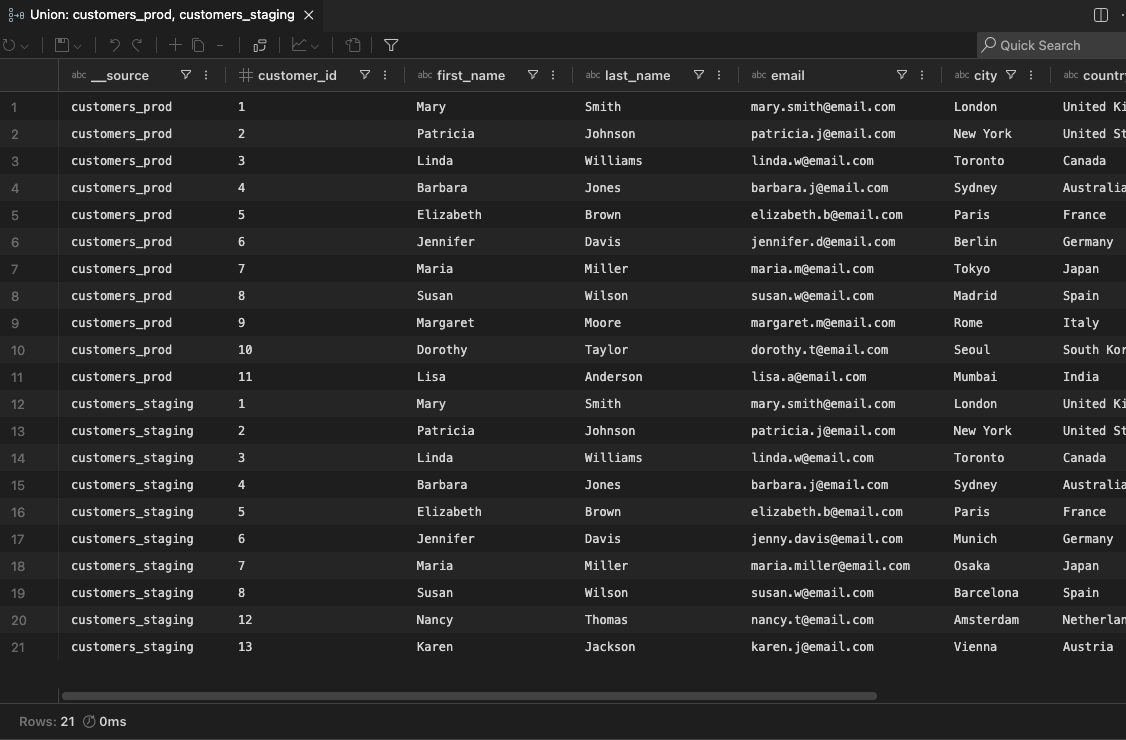
Section titled “Understanding the Results”The union result opens in a grid (either a dedicated editor tab from the DB Explorer, or a new result tab in the Results Panel). The grid has all the standard features — sorting, filtering, exporting, charting, and more.
Column Alignment
Section titled “Column Alignment”Columns from each source are aligned by name (case-insensitive). This means:
- Columns with the same name across sources are merged into a single column
- Columns that exist in one source but not another will contain
NULLfor the rows from the other source - The column order follows the first source, with any additional columns from subsequent sources appended
Source Identification
Section titled “Source Identification”A Source column is automatically added as the first column, showing which table or query each row originated from. This makes it easy to filter, sort, or group by source. When unioning across different connections, the connection name is included in the source label.
Cross-Server and Cross-Database Unions
Section titled “Cross-Server and Cross-Database Unions”One of the most powerful aspects of the Union feature is the ability to combine data from completely different servers and database systems:
- Same server, different databases - Union tables across schemas or databases on the same server
- Different servers, same database type - Combine data from production and staging
- Different database systems - Union a MySQL table with a PostgreSQL table, or SQL Server with Oracle
This is invaluable for:
- Aggregating similar data from multiple environments or regions
- Combining reference data scattered across different systems
- Building consolidated views across microservices with different databases
- Quick ad-hoc reporting across heterogeneous data sources