
QueryRun and control
Missing WHERE Detection
DBCode automatically detects DELETE and UPDATE statements that are missing a WHERE clause before they execute. This prevents accidental mass data modifications that could affect every row in a table.
How It Works
Section titled “How It Works”When you execute a DELETE or UPDATE statement without a WHERE clause, DBCode intercepts the query and shows a warning dialog before execution. This gives you a chance to cancel the operation and add the appropriate filter.
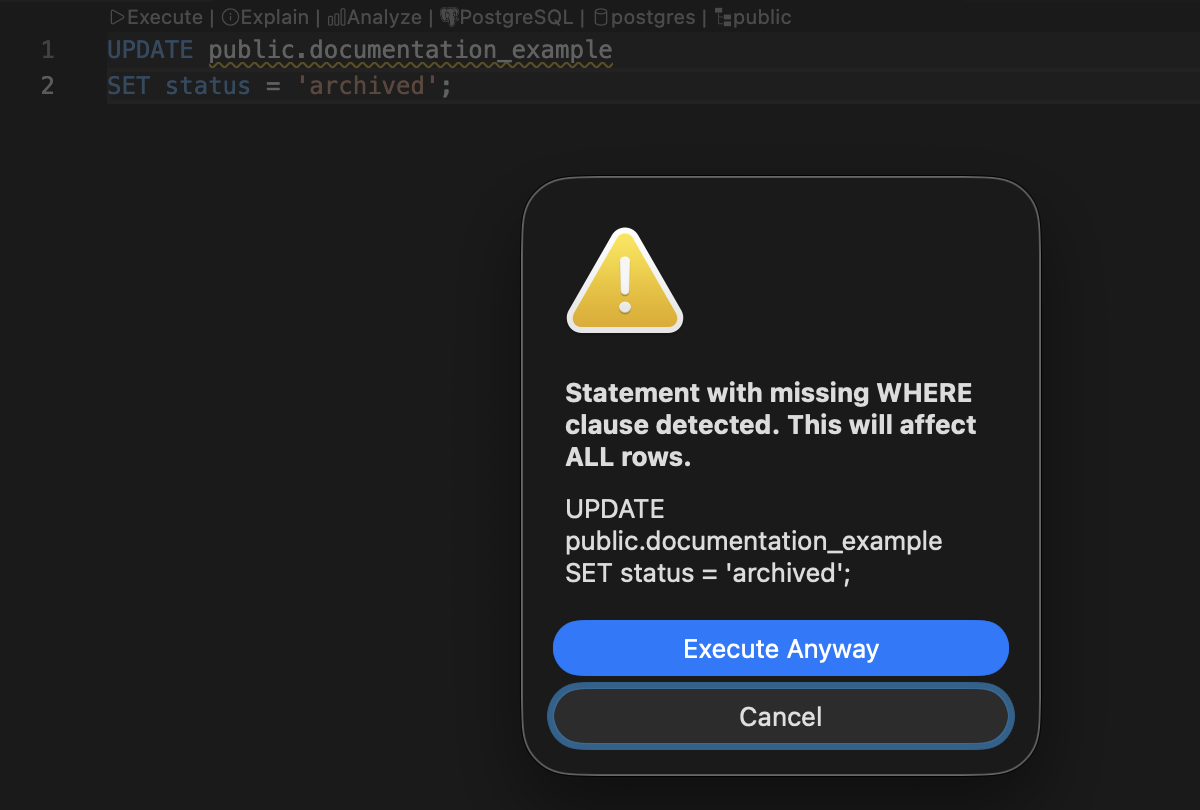
For example, the following statements would trigger the warning:
-- Missing WHERE on DELETE - will affect ALL rowsDELETE FROM users;
-- Missing WHERE on UPDATE - will affect ALL rowsUPDATE orders SET status = 'cancelled';
While these statements execute normally without a warning:
-- Has WHERE clause - targets specific rowsDELETE FROM users WHERE id = 5;
-- Has WHERE clause - targets specific rowsUPDATE orders SET status = 'cancelled' WHERE order_id = 123;
Detection Behavior
Section titled “Detection Behavior”| Statement | Detected |
|---|---|
DELETE FROM table | Yes |
DELETE FROM table WHERE ... | No |
UPDATE table SET ... | Yes |
UPDATE table SET ... WHERE ... | No |
SELECT * FROM table | No |
INSERT INTO table ... | No |
Subquery Awareness
Section titled “Subquery Awareness”The detection is aware of subqueries and only checks for WHERE at the top level of the statement. A WHERE inside a subquery does not count:
-- Still flagged - the WHERE is inside the subquery, not on the UPDATEUPDATE orders SET total = (SELECT SUM(amount) FROM items WHERE order_id = orders.id);
-- Not flagged - has a top-level WHERE clauseDELETE FROM users WHERE id IN (SELECT user_id FROM inactive);
CTE Support
Section titled “CTE Support”Common Table Expressions (CTEs) are handled correctly:
-- Flagged - DELETE has no WHERE clauseWITH cte AS (SELECT id FROM temp) DELETE FROM users;
-- Not flagged - DELETE has a WHERE clauseWITH cte AS (SELECT id FROM temp) DELETE FROM users WHERE id IN (SELECT id FROM cte);
Availability
Section titled “Availability”Missing WHERE detection runs automatically on every query execution. When combined with Connection Roles, the behavior is configurable per role:
| Permission | Behavior |
|---|---|
| Allow | No detection; statements execute without checking |
| Ask (default) | Warning dialog appears; you choose to proceed or cancel |
| Deny | Statements are blocked entirely |
The default settings for each role:
| Role | Missing WHERE |
|---|---|
| Development | Ask |
| Testing | Ask |
| Production | Deny |
Configuring Missing WHERE Detection
Section titled “Configuring Missing WHERE Detection”With Connection Roles
Section titled “With Connection Roles”- Open Settings in VS Code
- Navigate to Extensions > DBCode > Connection Roles
- Find the role assigned to your connection
- Set the Missing WHERE permission to Allow, Ask, or Deny
Without Connection Roles
Section titled “Without Connection Roles”When no role is assigned, missing WHERE detection defaults to Ask behavior, showing a confirmation dialog when a potentially dangerous statement is detected.