
QueryRun and control
Editor Connection Idle Timeout
DBCode maintains dedicated connections for SQL editor tabs to support features like transaction control. These connections run periodic keepalive queries to prevent server-side disconnection.
For serverless or pay-per-query databases like Redshift Serverless, Snowflake, BigQuery, and Databricks, these keepalive queries can result in unexpected charges. The Editor Connection Idle Timeout setting allows you to automatically release these connections after a period of inactivity.
Configuring the Idle Timeout
Section titled “Configuring the Idle Timeout”The idle timeout is configured per-connection in the Advanced section of the connection settings:
- Open the connection configuration (click the edit icon on your connection)
- Scroll to the Advanced section
- Set Editor Connection Idle Timeout to your preferred value:
- Never (default) - Connections are kept alive indefinitely
- 5 minutes - Recommended for serverless databases
- 10 minutes
- 15 minutes
- 30 minutes
- 1 hour
How It Works
Section titled “How It Works”When the idle timeout is enabled:
- Timer starts when a query completes and the editor becomes idle
- Timer pauses while a query is running, and resets when it finishes
- Connection releases automatically when the timeout expires
Because the timer only counts idle time, a query that takes longer than the timeout is never interrupted. A five minute timeout will not cut off a query that runs for an hour.
Handling Uncommitted Changes
Section titled “Handling Uncommitted Changes”If you have uncommitted changes when the timeout expires (auto-commit is off):
- A warning notification appears showing the remaining time
- The timeout is extended by the same period to give you time to respond
- You can click Cancel to keep the connection and reset the timer
- If the grace period expires, changes are automatically rolled back and the connection is released
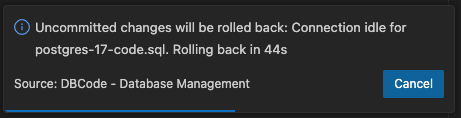
The grace period gives you time to commit or rollback your changes before the connection is released.
Recommended Settings
Section titled “Recommended Settings”| Database Type | Recommended Timeout |
|---|---|
| Redshift Serverless | 5 minutes |
| Snowflake | 5-10 minutes |
| BigQuery | 5-10 minutes |
| Databricks | 5-10 minutes |
| Provisioned databases | Never (default) |
For provisioned databases where you pay a fixed cost regardless of queries, the default “Never” setting is appropriate and provides the best user experience.
Output Logging
Section titled “Output Logging”When connections are released due to inactivity, DBCode logs the event to the Output panel:
- Clean release:
Connection: Released idle pinned connection for 'myfile.sql' after 5 minute(s) - With uncommitted changes:
Connection: Released idle pinned connection for 'myfile.sql' after grace period (2 changes rolled back)
Debug Sessions
Section titled “Debug Sessions”The idle timeout does not apply to the dedicated connections a debug session uses. A routine paused at a breakpoint exists only on the backend that is running it, so releasing and reconnecting would lose the session. Those connections are held until the session ends, however long you spend stepping through the code.
Related
Section titled “Related”- Transaction Control - Learn about managing database transactions
- Debugger - Step through stored routines with breakpoints and variables