
QueryReuse
Saved script library
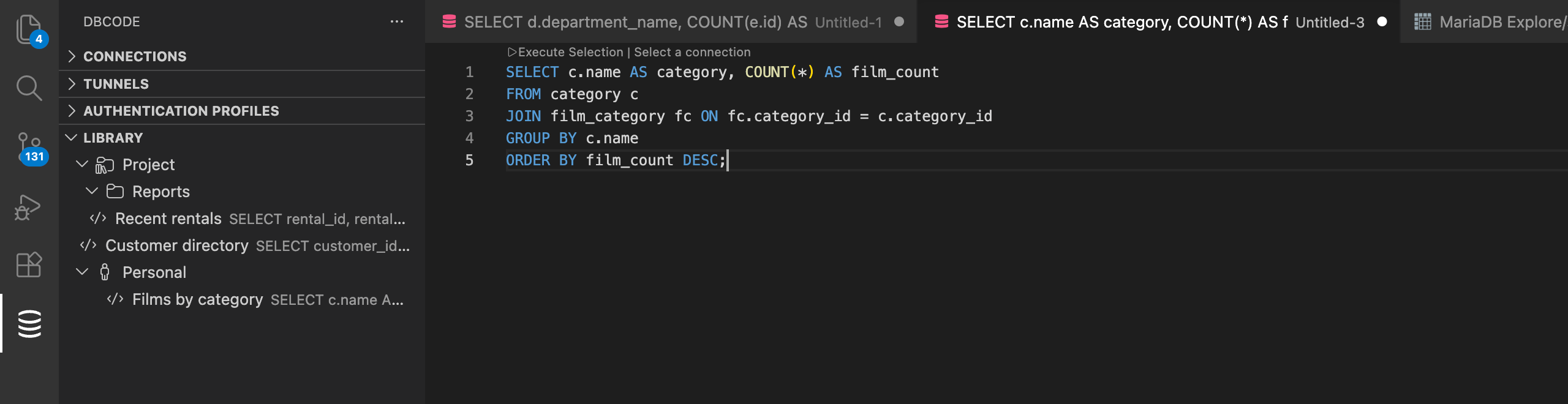
The Library lets you save and organize reusable items across your projects. It holds:
- SQL files - plain
.sqlfiles in the Library folder, listed directly in the tree - Query Builder queries - Full visual Query Builder state (tables, joins, filters, columns)
- Explore views - Saved data exploration configurations
- File references - Links to files elsewhere in your workspace
Saved SQL is an ordinary file on disk containing nothing but your SQL. When you save a selection, DBCode writes a plain .sql file into the Library folder; open it and you are editing the real file. If the editor was connected to a database, DBCode records that connection as an entry in the existing dbcode.connectionBindings setting (workspace settings for Project items, user settings for Personal items), and renaming or moving the script keeps the entry up to date. Snippets saved with older DBCode releases are converted to this format automatically in the background.
Project and Personal Scopes
Section titled “Project and Personal Scopes”Items are organized under two scopes:
- Project - Stored in
.dbcode/library/in your workspace folder. Shared with anyone who opens the project (ideal for team queries and shared scripts). - Personal - Stored in your VS Code global storage. Private to you and available across all workspaces.
Adding Items
Section titled “Adding Items”Save from the SQL Editor
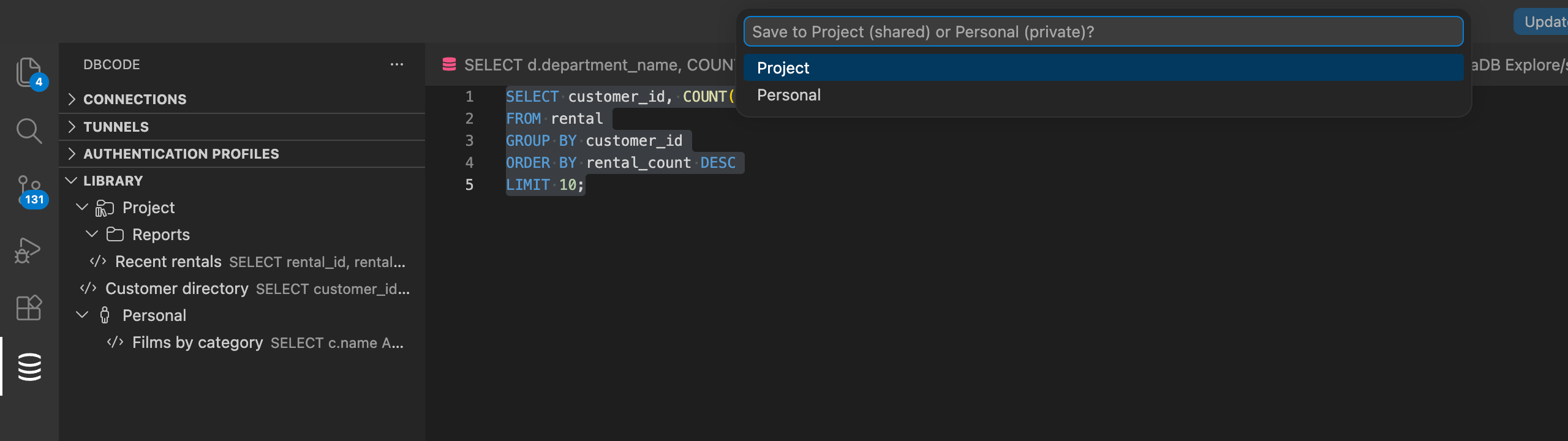
Section titled “Save from the SQL Editor”- Select SQL text in any editor
- Click Add to DBCode Library in the editor toolbar, or run the command from the Command Palette
- Enter a name
- Choose Project or Personal in the scope picker
DBCode writes the selection as a plain SQL file in the Library folder. If the editor was connected to a database, a dbcode.connectionBindings entry remembers that connection and database for the file.
Save from the Query Builder
Section titled “Save from the Query Builder”Click Save to Library in the Query Builder toolbar:
- First save - Prompts for a name and scope, then stores the full visual state (tables, joins, filters, columns, positions) along with the generated SQL
- Subsequent saves - Updates the saved item silently
- Save As New - Creates a copy with a new name
Drag Files from the Explorer
Section titled “Drag Files from the Explorer”Drag .sql or other files from the VS Code Explorer into the Library panel. DBCode creates a file reference that opens the file when clicked. For Project scope, workspace-relative paths are stored so references work for all team members.
Organizing with Folders
Section titled “Organizing with Folders”Right-click on a scope root or existing folder and choose Create Folder. Drag and drop items and folders to rearrange them, including moving items between Project and Personal scopes.
Opening Items
Section titled “Opening Items”Click any item in the Library tree to open it:
- SQL files open the real file. If you have run the file before, your remembered connection applies; otherwise its connection binding applies; otherwise it opens plainly
- Query Builder queries restore the full visual state in a Query Builder tab
- File references open the linked file, bound to the saved connection when one was captured
If the saved connection is not available locally (for example, a shared project item from a teammate whose connection ids differ), the file simply opens unbound - no picker interrupts you, and the usual per-file and folder connection behavior applies when you run it.
Opening Against a Different Connection
Section titled “Opening Against a Different Connection”Right-click a Query Builder query or a SQL file reference and choose Open With Connection…. DBCode asks which connection to use and opens the item bound to that one instead of the connection saved on it. The saved item is unchanged, and a plain click still opens it against its own connection.
Renaming and Deleting
Section titled “Renaming and Deleting”Right-click any item or folder to rename or delete it. Deleting a folder removes all items inside it.
File Format
Section titled “File Format”Library items are stored as plain files, all in one folder:
| Type | Extension | Format |
|---|---|---|
| SQL file | .sql | Plain SQL, nothing else |
| Query Builder | .qb.json | JSON with builder state and generated SQL |
| Explore | .explore.json | JSON with exploration configuration |
| File reference | .file.json | JSON with the file path and optional connection |
SQL files contain only your SQL, so they can be version-controlled, shared, run by other tools, and edited freely. Connection bindings live in settings, where teammates can share them through committed workspace settings.
Where the Files Live
Section titled “Where the Files Live”Project items are in .dbcode/library/ in your workspace folder. DBCode watches that folder, so editing a file there updates the Library panel straight away.
Personal items are in VS Code’s global storage for the extension:
| Platform | Path |
|---|---|
| macOS | ~/Library/Application Support/Code/User/globalStorage/dbcode.dbcode/library |
| Windows | %APPDATA%\Code\User\globalStorage\dbcode.dbcode\library |
| Linux | ~/.config/Code/User/globalStorage/dbcode.dbcode/library |
On a VS Code fork, swap Code for that editor’s own folder (for example Cursor or VSCodium). Personal storage is not watched, so after editing a file there, click Refresh at the top of the Library panel to pick up the change.
Snippets saved by older DBCode releases (.sql files starting with a YAML header) are converted automatically at startup: the header is removed in place, keeping the same filename and the SQL untouched, and the header’s connection moves into a dbcode.connectionBindings entry. Old snippets that arrive later through Git convert on the next window load.
Related Features
Section titled “Related Features”- Favorites: Bookmark database objects in the connection tree for quick access
- Query Builder: Build queries visually and save them to the Library
- Query History: Automatically track and recall executed queries