
QueryRun and control
Multi-Statement Batch Tab
When you run a script that contains more than one statement, DBCode shows a Batch tab that anchors the whole batch. It reports live progress while the script executes, then a summary when it finishes. You no longer get one result tab per statement.
What you see by statement type
Section titled “What you see by statement type”DBCode decides where each statement’s result goes based on whether it returns columns:
- SELECTs (anything that comes back with columns, including
INSERT ... RETURNING,MERGE ... OUTPUT,CALLreturning a resultset,SHOW,DESCRIBE, and so on) still get their own result tab with a data grid. - DML and DDL (
INSERT,UPDATE,DELETE,CREATE,ALTER, and similar statements that return only a row count) flow into the Batch tab’s per-statement list and the output log. They no longer open individual tabs.
When the Batch tab appears
Section titled “When the Batch tab appears”The Batch tab is the tab that shows while the batch is executing. What happens when the batch finishes depends on what it produced:
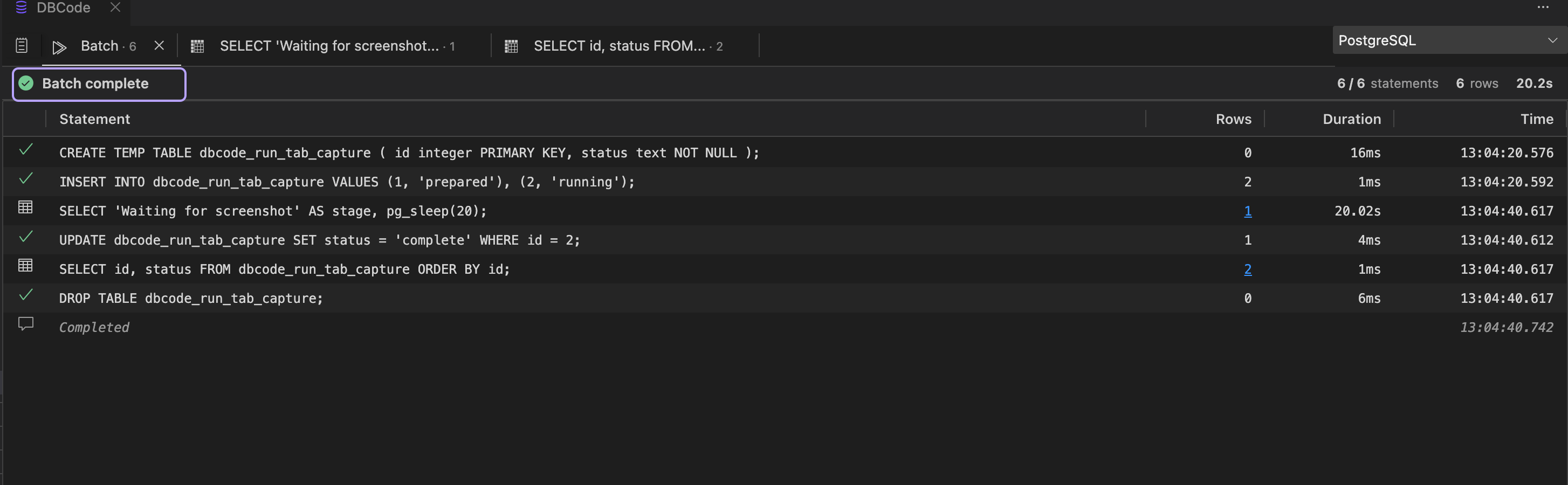
- All SELECTs, no errors - the Batch tab is dismissed and focus moves to the first result tab. You just see your result grids, exactly as before.
- Any DML/DDL, or any error - the Batch tab stays, showing the batch summary and per-statement detail.
Single-statement execution is unchanged: a SELECT shows its grid, an INSERT shows “Success, N rows affected”.
When a CREATE TABLE, CREATE VIEW or CREATE MATERIALIZED VIEW succeeds, its message has buttons to open what it made: Open table and Query Builder for a table, Open view for a view or materialized view. They show on a single statement’s message and on the statement’s row in the Batch tab, in the editor and in notebooks. In a narrow panel the buttons show only their icons. A temporary table gets none.
While the batch runs
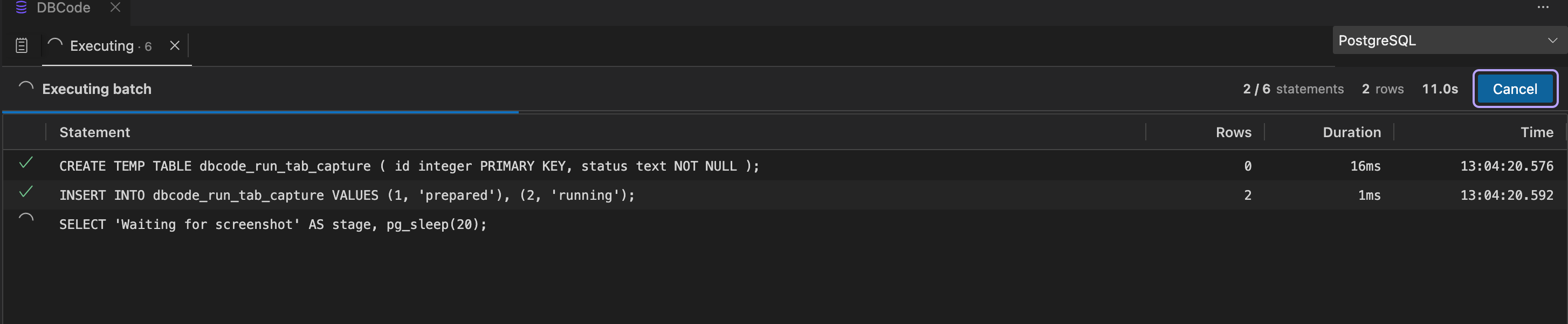
Section titled “While the batch runs”The Batch tab shows live progress:
- How many statements have completed out of the total
- Total rows affected so far
- Elapsed time
- The statement currently executing (for supported drivers)
A Cancel button on the Batch tab stops the batch.
When the batch finishes
Section titled “When the batch finishes”The Batch tab summarizes the run: total statements, total rows affected, and total time. If any statement failed, each error is listed with its line number. Click any row to show its statement in the editor while the Batch tab keeps focus; double-click it, or right-click and pick Go to Statement, to jump there. Select several rows (click, then shift-click or drag) and copy them with Copy or Cmd/Ctrl+C. If the file has changed above the statement since the run, DBCode tells you instead of jumping. Every statement is also recorded in the output log (the notepad icon on the left of the results panel), which keeps a history across runs.
Server messages
Section titled “Server messages”Server-side messages land in the output log alongside statements. PostgreSQL RAISE NOTICE, RAISE INFO, and RAISE WARNING, and SQL Server PRINT (plus low-severity RAISERROR), each appear as their own row as the script runs, with the severity shown as the row’s action and any JSON payload syntax-colored. Hover a row to see the full text in a tooltip, where JSON is formatted and colored, or right-click a row to copy it.
A RAISE EXCEPTION (Postgres) or a RAISERROR above severity 10 (SQL Server) aborts the statement, so it surfaces as an error on the run rather than a message.
Many SELECTs: the overflow tab
Section titled “Many SELECTs: the overflow tab”If a batch produces a lot of SELECT results, the first several open as individual tabs and the rest collect into a single stacked overflow tab, so a script with hundreds of queries does not flood the panel with tabs. Use the existing Unstack action to split the overflow tab back into individual tabs.
The dbcode.stackThreshold setting
Section titled “The dbcode.stackThreshold setting”Controls how many individual SELECT result tabs a batch opens before extra results stack into the overflow tab. The default is 15. Set it to 0 to disable overflow entirely, so every result gets its own tab.
Notebooks
Section titled “Notebooks”The same behavior applies to multi-statement SQL notebook cells: the cell output shows a Batch tab following the same rules.