
Data
Toolbar Pins
Copying results as JSON, or exporting a selection to CSV, normally takes a trip through the right-click menu. Pin the ones you reach for and they become a single click on the results toolbar.
Pinning an action
Section titled “Pinning an action”Click the + at the end of the results toolbar. It opens a menu of everything you can pin: the Copy As, Export and Open trees, along with Share, Select All and the clear-filters and clear-sorts actions.
Pick one and it appears on the toolbar immediately, in every open grid. The right-click menu has no pinning of its own; the + is the one place it happens.
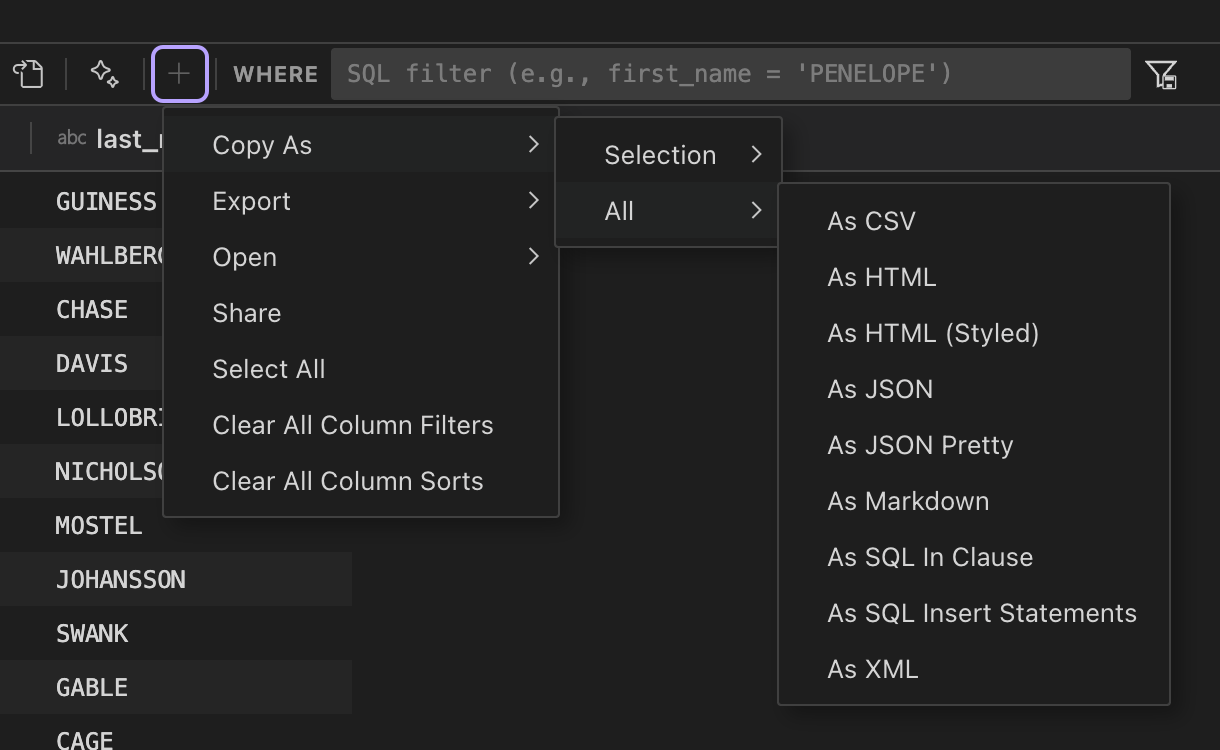
How pins are grouped
Section titled “How pins are grouped”Pins group by what they do, and each group is a single button. Pin five copy actions and you get one Copy button, not five icons.
The button is labelled with the action a click will run, naming both what it does and the format
it does it in, so Copy JSON copies JSON and Export CSV writes a CSV file. Actions that take no
format, such as Share, are named on their own.
When a group holds more than one pin the button grows a chevron. Opening it lists every pin in that group by its full name, with a tick against the one the button currently runs:
Copy JSON ▾ ✓ Copy selection as JSON Copy all rows as JSON Pretty Copy selection as CSV Copy selection as SQL In Clause ────────────── Rename... Unpin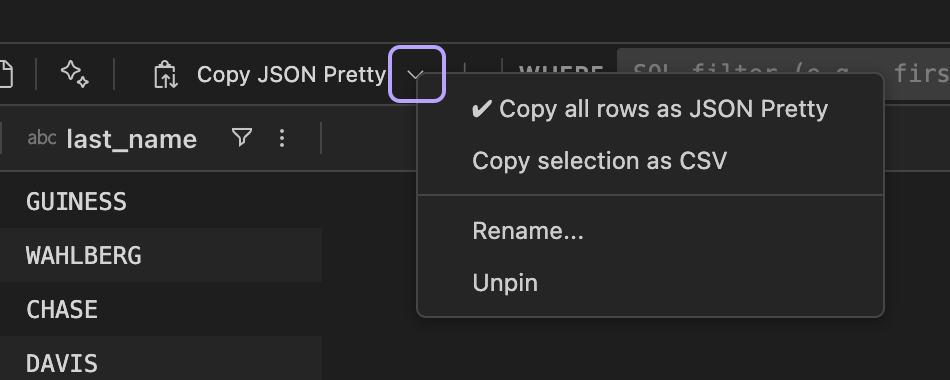
Choosing an entry runs it and moves it onto the button, so the action you used last is the one a click repeats. A group holding a single pin has no chevron, because there is nothing behind it.
Renaming, removing and reordering
Section titled “Renaming, removing and reordering”Right-click a button for Rename…, Unpin and Reset Toolbar. These act on the pin the button is currently showing, so to act on a different one in the same group, pick it from the chevron first and it moves onto the button.
Drag a button to move it. The other buttons shift as you drag, so the order you are about to get is the order you can see. Reset Toolbar clears every pin at once.
When pins don’t fit
Section titled “When pins don’t fit”On a narrow results panel the WHERE filter gives up width first. Once it can shrink no further, buttons that no longer fit collapse behind a chevron at the end of the zone. Click it to reach them; choosing one runs it directly.
What can’t be pinned
Section titled “What can’t be pinned”Actions that depend on the cell or column you right-clicked, such as filtering by a particular value or clearing a single column’s sort, aren’t offered. A toolbar button has no clicked cell to act on.
The buttons DBCode places on the toolbar itself, such as Refresh and Save, keep their positions and can’t be pinned, moved or hidden.
Where pins are stored
Section titled “Where pins are stored”Pins are a personal preference, stored in your user settings.json under
dbcode.grid.toolbarPins, so Settings Sync carries them between your own machines:
"dbcode.grid.toolbarPins": [ { "id": "copy.all.jsonPretty" }, { "id": "export.selection.csv", "label": "csv" }]The array order is the order the buttons appear in, and a label records a rename.